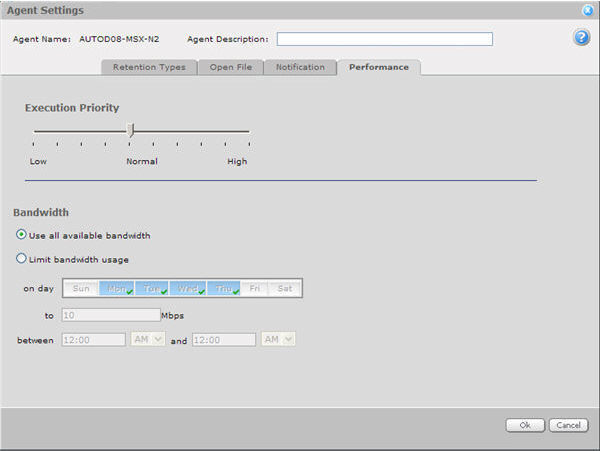
Execution Priority affects the processing priority of a Windows or Unix Agent on a computer running a backup or restore.
To set the Agent's Execution Priority, drag the slider. HIGH is the highest priority, and Low commands the least CPU priority. Normal (the default setting) is usually adequate, depending on the applications being run on the computer during the assigned Job.
Bandwidth Throttling allows you to control the amount of network bandwidth consumed by the Agent (Windows or Unix) during backups and restores. For example, you might want restrictions on daytime ad-hoc backups/restores so that online users are not affected, and then unlimited usage at night so that scheduled backups will run as fast as possible.
This configuration includes:
Maximum bandwidth (upper limit), in megabits per second, to be consumed during each backup and restore
Period of time during the day that throttling is in effect
Only one time window can be specified. Outside the window, no throttling takes place.
Days of the week that throttling is in effect
The time period will appear in 24-hour format, or AM/PM format (depending on the browser's time format).
The bandwidth setting applies globally to all Jobs, but it may be overridden for a restore. It cannot be overridden for an ad-hoc backup. The setting is determined at the start of the Job. The setting is adjusted dynamically if the Job crosses a throttling window boundary.
Bandwidth throttling only applies to a single Agent. It does not apply across multiple Agents. So two Jobs running on the same Agent can split the upper bandwidth between them, and two Jobs running on different Agents can each consume the upper bandwidth.