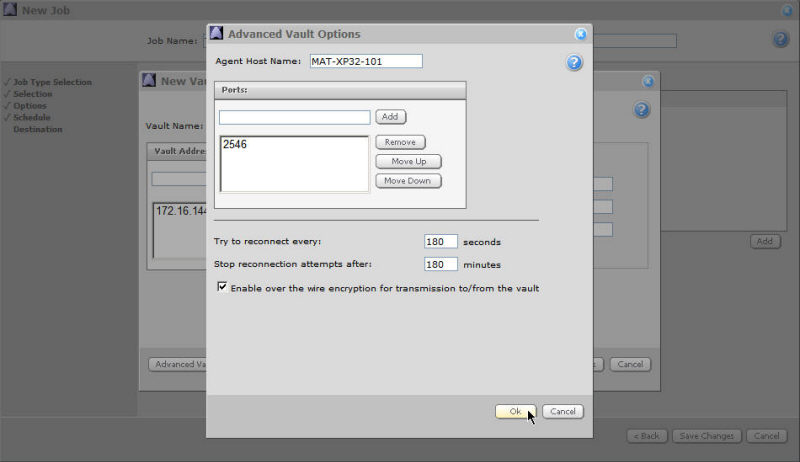
The nature of the software is to provide secure, long-term sessions of activity each day. Network transports such as TCP are notoriously poor at providing stable connectivity.
To help overcome this, BRTP (Backup Restore Transport Protocol) has added network connectivity resumption support to the protocol. This means that in the event of any kind of network failure, a backup or restore Job will recover and resume its functions where it left off.
Enter the port values at which the new vault will listen. The list will display all currently configured ports. The default port for new installations is 2546. For upgrades, use 807. Should you create multiple ports, the ports will be attempted in descending order.
Alternatively, you can use any other port, but you will need your service provider's approval. The highest port number that the list will allow is 65536.
If the port that you select is used by another service, a message notifies you and offers the opportunity to continue or use another port. You can add another port using the Ports pane and the Add button.
Note: If you choose to add a new port, you might need to discuss the options with your Service Provider.
The default connection/reconnection settings are optimized for most network situations. If you wish to change them, follow these steps:
In the "Try to reconnect every:" field, enter the maximum number of seconds over which your system should try to reestablish connection with the server before terminating/failing the Job. This value should be between 3 and 3600 seconds. The default value is 180 seconds.
In the “Stop reconnection attempts after:” field, enter the number of minutes after which you want to stop trying to reconnect. This value must be between 1 and 1440 minutes. The default value is 180 minutes. This value (entered in minutes) must also be greater than the value (entered in seconds) in the “Try to reconnect every:” field.
Note: In both of these fields, you must enter natural numbers (i.e., positive numbers without fractions, decimals or commas).
You can use over the wire (OTW) encryption for transmissions to and from the vault. This is enabled by default, using AES encryption. The OTW encryption functionality will apply to any Job that uses this profile.
You can turn this off if security is not an issue. That is, when unauthorized users cannot see network traffic (e.g., with a “Sniffer” type device), the network is secure. Turning OTW off will also provide a little more speed/efficiency for backups and restores.